SHOPIFY INTEGRATED POS
Shopify Integrated POS for Retail Stores
iSmartSync is a POS built for Shopify brands with physical branches. Sell at the counter, keep every branch and your Shopify store on the same stock, and pack and ship online orders from any branch, all in one app.
✓ No card needed · ✓ Set up in minutes
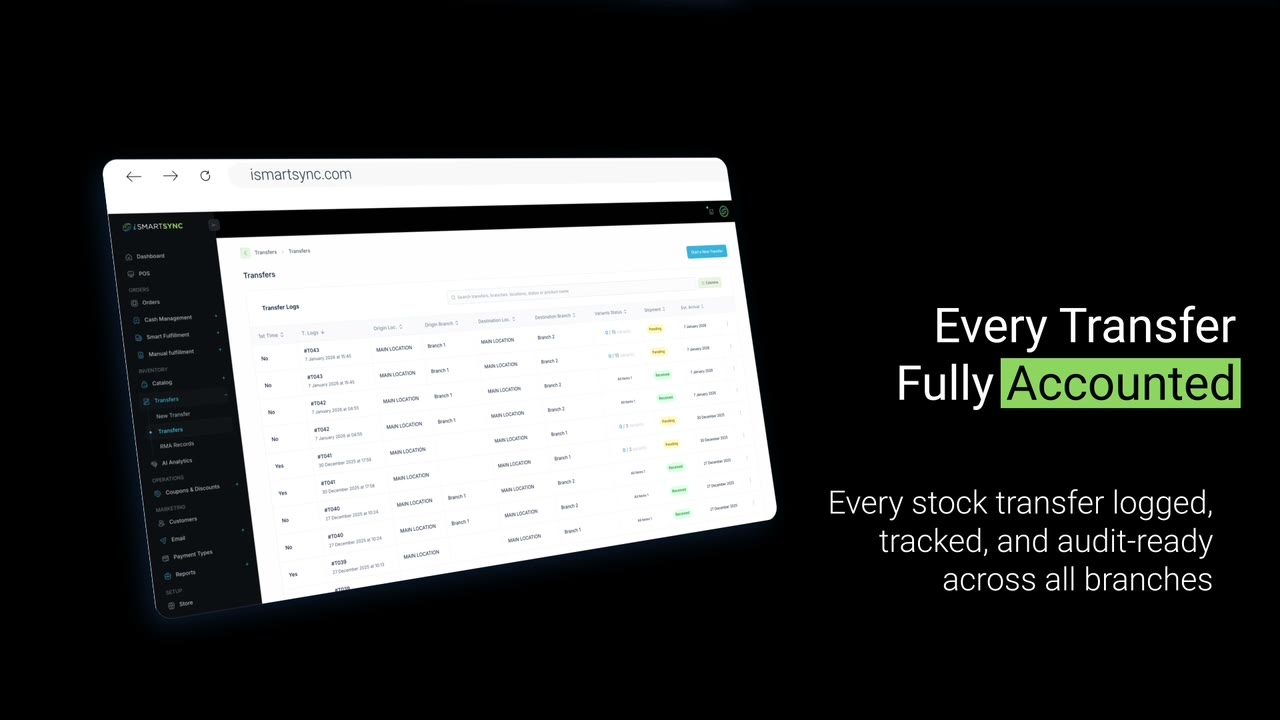
HOW IT WORKS WITH SHOPIFY
From import to counter to courier, in one app.
Click each step to see the real screen.
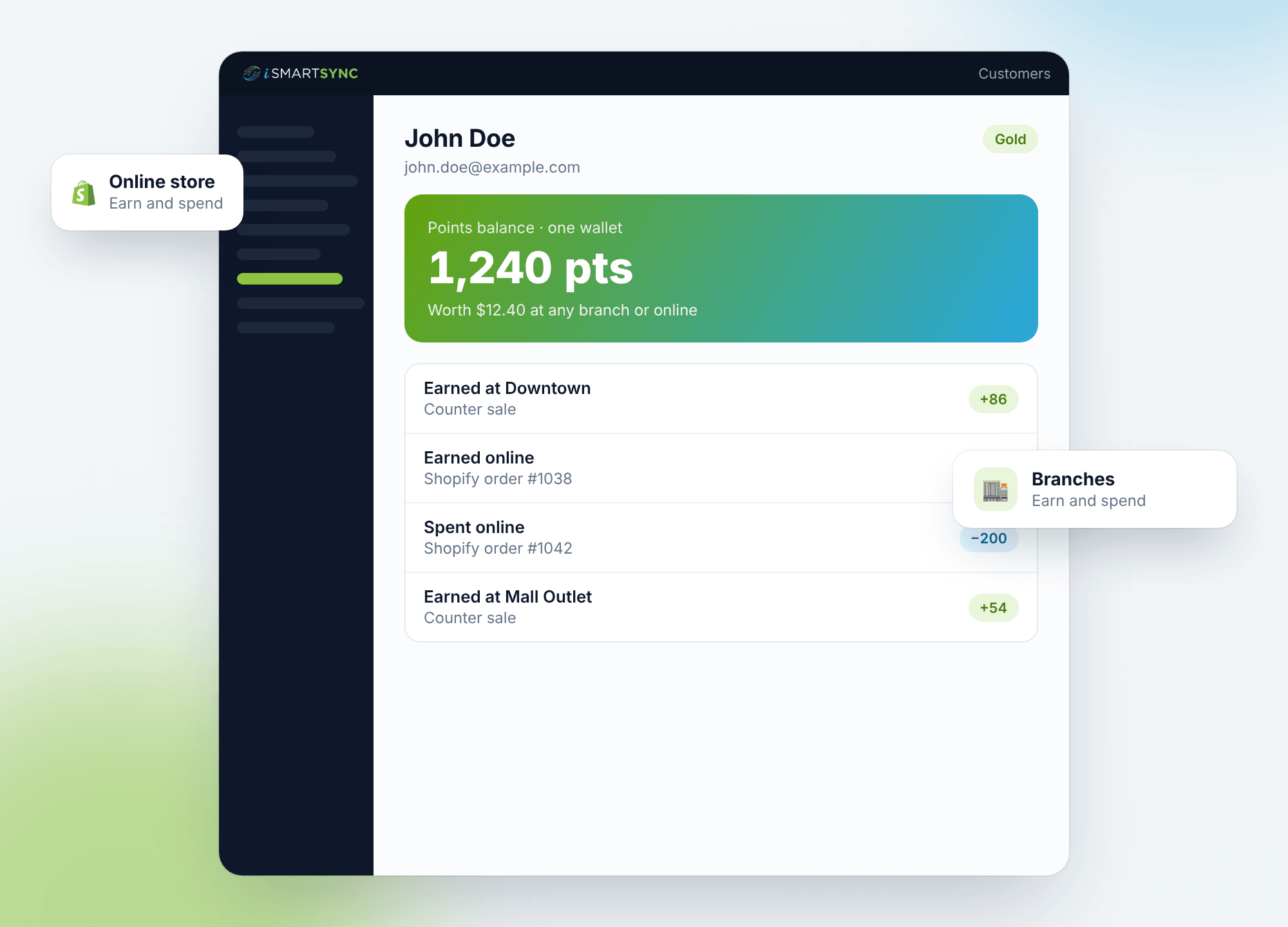
BUILT FOR SHOPIFY
Every POS says it connects to Shopify. iSmartSync is built for it.
iSmartSync installs as a Shopify app. Each branch sits under a Shopify location, so a sale at the counter, a transfer or a packed online order all move the same stock you see in Shopify.
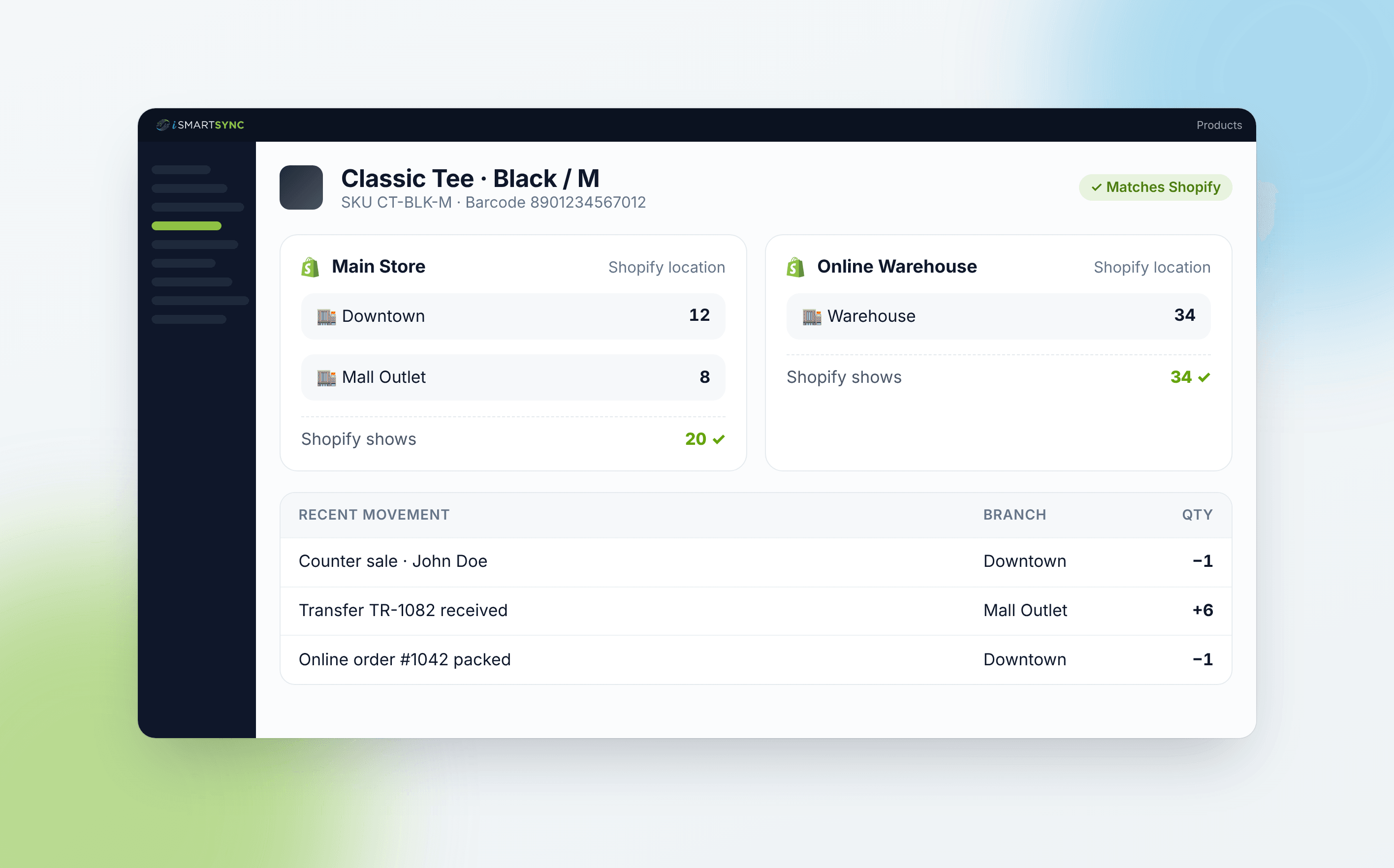
See stock per branch and per Shopify location on one product page
1 app
Installs from Shopify
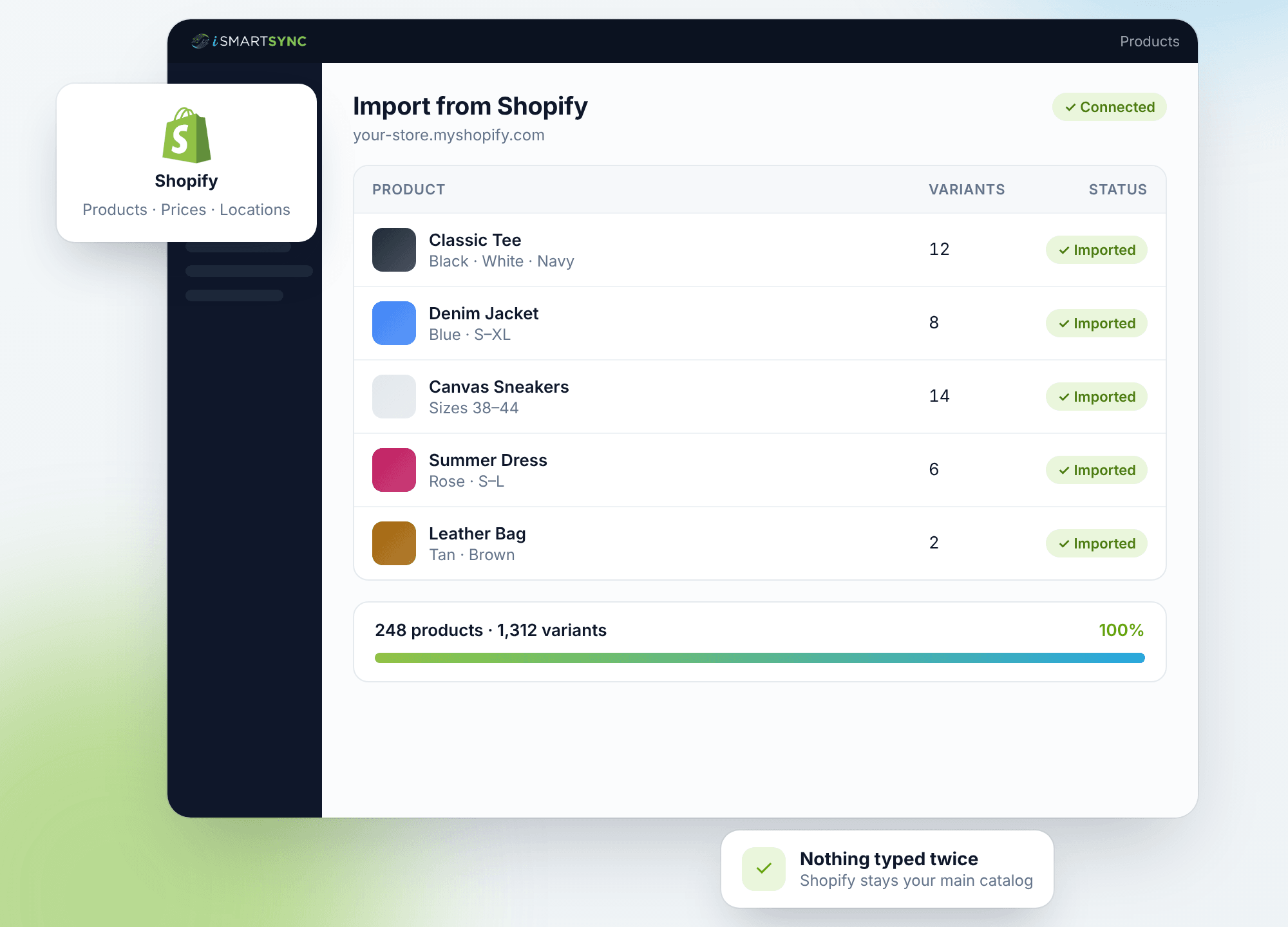
Import products, variants, prices and locations from Shopify. Nothing is typed in twice, and Shopify stays your main catalog.
No Shopify POS hardware needed
Runs in the browser on a PC or laptop (tablets work too) with a barcode scanner and a thermal receipt printer. No Shopify Payments needed.
100+
Features in one app
Counter sales, stock transfers, purchase orders, barcode labels, loyalty, courier booking and 20+ reports.
Live
Shopify stock updates
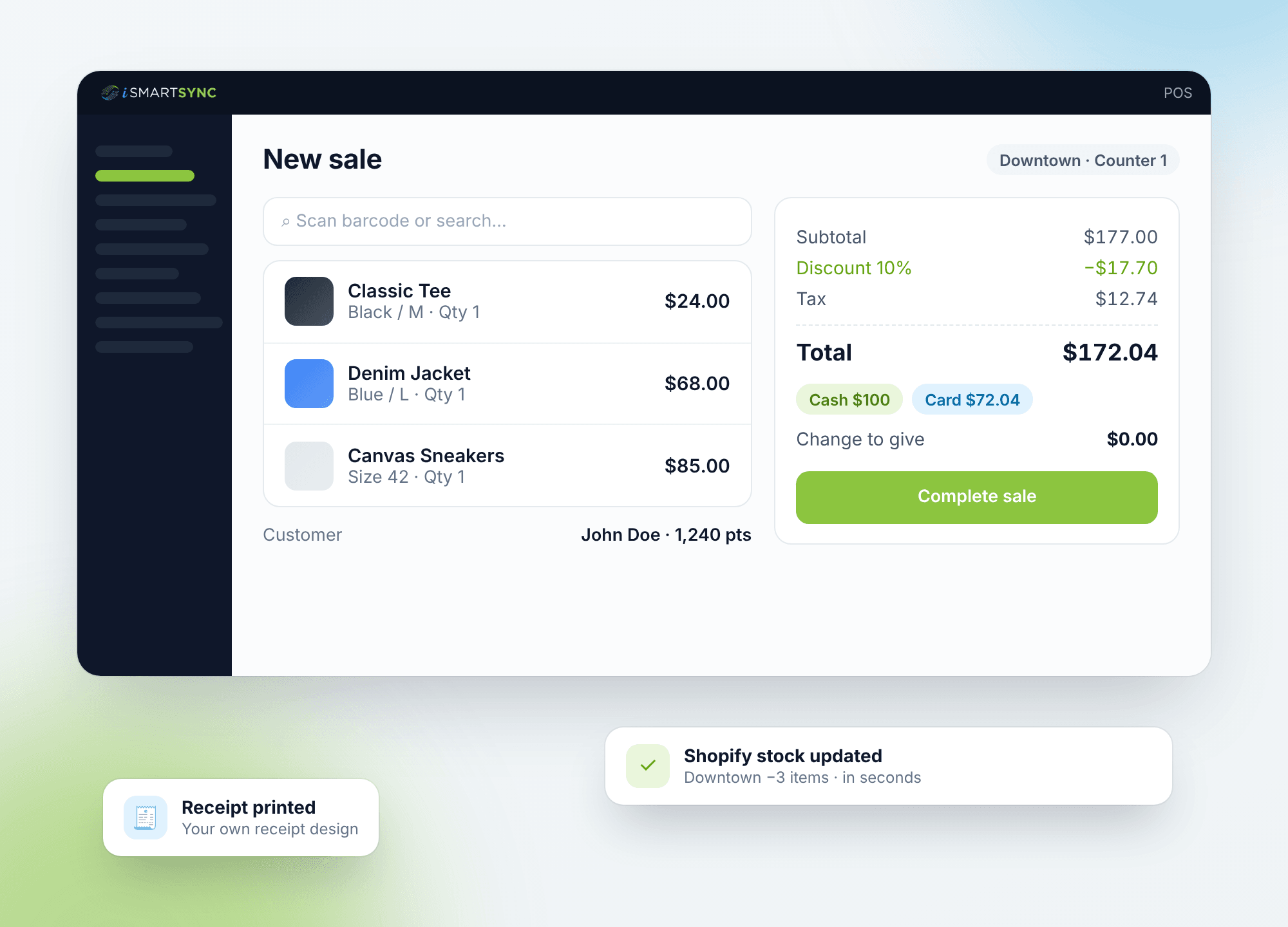
Counter sales, refunds and exchanges update the Shopify quantity for that location. If Shopify is slow, the sale is saved and synced after.
“Our rule”
“Your branches and your Shopify store should never disagree about what is in stock.”
— iSmartSync


Why a POS built for Shopify is different
Most POS systems treat Shopify as one more sales channel and only copy stock counts across. iSmartSync starts from your Shopify store: products come from Shopify, each branch sits under a Shopify location, and online orders are packed and shipped from the branch that holds the stock. Your team uses one app for counter sales, transfers, purchase orders, courier booking, returns and loyalty, and Shopify always shows the right quantity. iSmartSync is a POS built for Shopify stores with branches, used worldwide: one live stock across every branch, counter and your Shopify store, with order fulfillment, courier booking and billing in your store's currency. In Pakistan it also gives FBR invoicing, PKR prices and COD courier booking.
One app for the counter, the stockroom and online orders
Everything a Shopify brand with branches needs day to day, without a second system next to Shopify.
At the counter
A fast billing screen your staff learn in one shift.
- Barcode scanning, discounts and coupons
- Cash, card, bank and split payments
- Shifts, cash registers and receipts you design
In the stockroom
Stock you can trust across branches and Shopify.
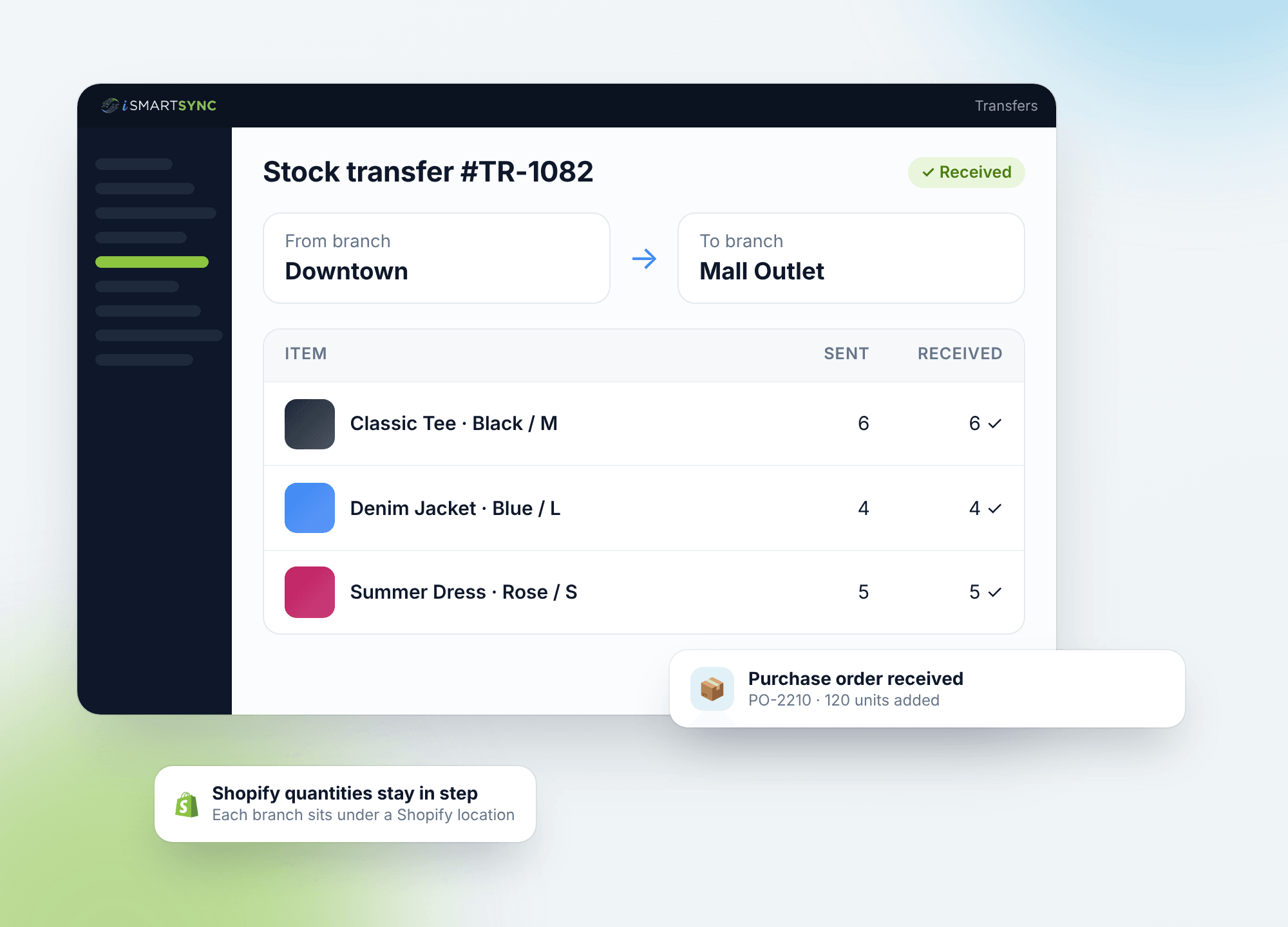
- Each branch sits under a Shopify location
- Transfers, purchase orders and goods received
- Barcode labels for every product
For online orders
Ship Shopify orders without a separate courier app.
- Pack from the branch that has the stock
- Works with major couriers like TCS, Trax, PostEx etc.
- Branded tracking page and COD matching
A hero for every job in your shop.
Each iSmartSync power has its own hero. Pick one to watch it in action.
Every sale, refund and transfer updates Shopify and every branch.
See Auto Stock Sync →HOW STOCK MOVES IN ISMARTSYNC
Store sales deduct instantly. Shopify orders follow your fulfillment flow.
At the counter, iSmartSync deducts stock from the selling branch and Shopify syncs to match. For Shopify orders, your team can use Smart Fulfillment inside iSmartSync or Manual Fulfillment for branch-side stock recording after Shopify is handled.

Shopify orders start here

Branch stock is managed here
A customer checks out at the branch counter.
Stock deducts immediately from that branch, and Shopify syncs to match the new quantity.
Staff fulfills the Shopify order inside iSmartSync.
Your team chooses the branch inside iSmartSync and completes the fulfillment flow there, so branch stock moves through Smart Fulfillment.
Branch staff records what physically went out.
iSmartSync deducts branch stock as an internal movement record, while Shopify fulfillment stays handled separately.
One clear rule for store sales, two clear fulfillment paths for Shopify orders, and branch stock that stays understandable for your whole team.
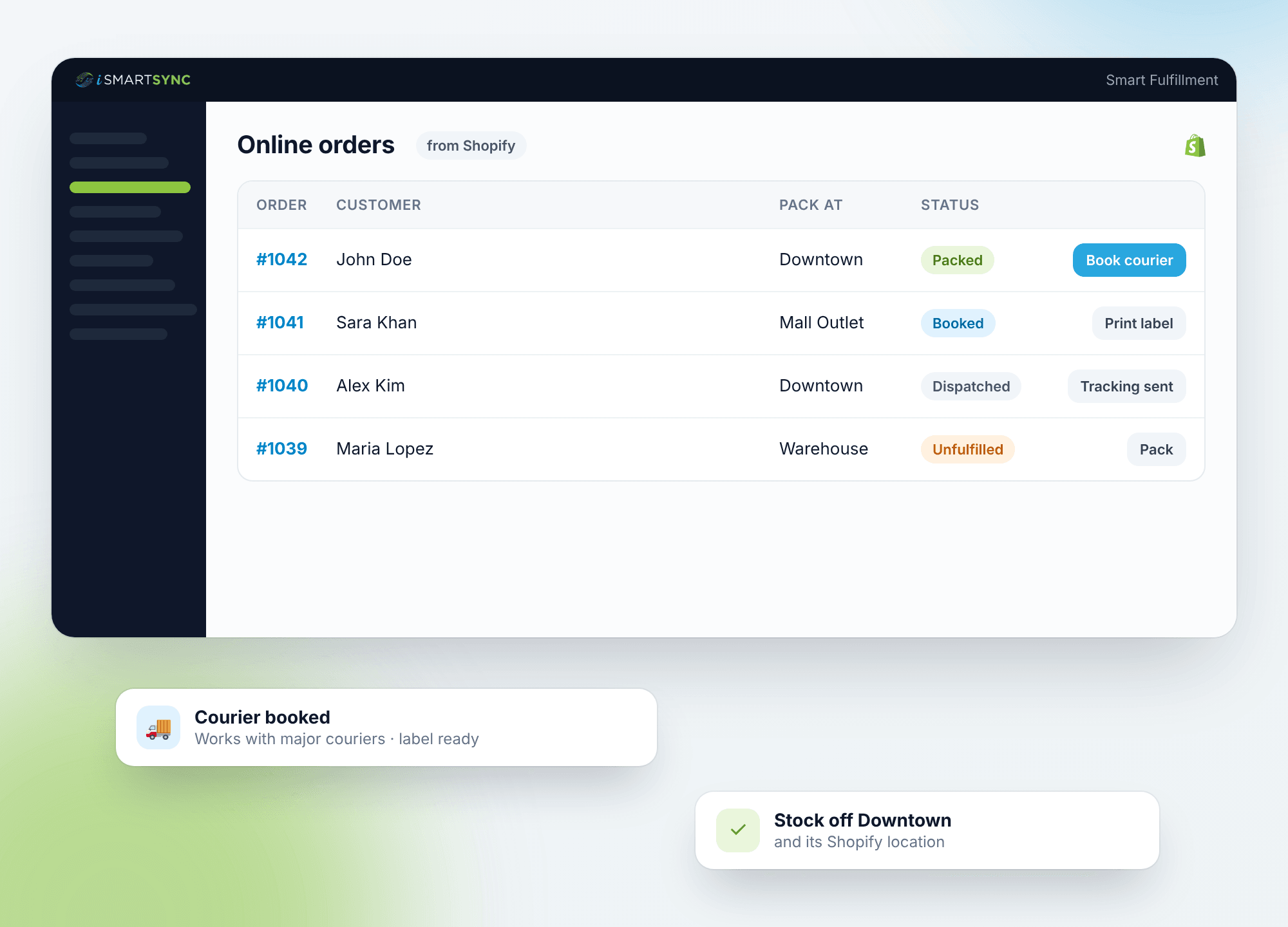
Courier booking built in
Your Shopify store, your branches and your courier, in one app
No separate courier app. Stock leaves the branch that actually ships the parcel.
Order
#1042
John Doe
12 Main Street, Springfield
1 × Shirt · 1 × Jeans
- ✓Packed at Branch 1Packed
- ✓Courier bookedBooked
- ✓Tracking added to ShopifyFulfilled
Pack the order and book your courier from the same screen. Book one parcel or a whole day's orders at once.
Labels and the rider's load sheet in one click. The tracking number goes to Shopify on its own.
Customers follow the parcel on a tracking page inside your own store, in your colours.
Import the courier's COD payment file and see which parcels are paid and which are not.
SHOPIFY INTEGRATED POS, EXPLAINED
Why connected Shopify POS beats delayed or fragmented sync
Pick a scenario and see how a real Shopify Integrated POS behaves differently from patchwork tools and connector-style logic.
Scenarios
Selected scenario
Online order comes in
Pain: Stock changes before anything moves.
What usually happens
Most systems reduce stock the when an order is placed, even though the item is still on the shelf.
Fixing is manual. Drift builds over time.
What iSmartSync does
iSmartSync waits until staff pick and pack the item, then reduces stock from the chosen branch.
One rule. Consistent stock.
Related benefits
Golden rule
If nothing moved, stock should not change. (No item moved, no stock change.)
Most POS systems update stock when orders change. iSmartSync updates stock when items are physically picked.
CORE CAPABILITIES
Retail operations built on real movement
iSmartSync is a Shopify-dependent POS that tracks inventory the way stores actually work — across counters, branches, and online orders.
Shopify ↔ POS real-time handshake
Shopify creates online orders. iSmartSync controls in-store sales and physical stock movement. Both update each other live — no syncing delays, no duplicate inventory logic.
Explore Shopify handshakeMovement-based inventory system
Stock updates only when items are sold, packed, transferred, or returned — never when an order just appears online.
Explore inventory logicPOS-driven Shopify order fulfillment
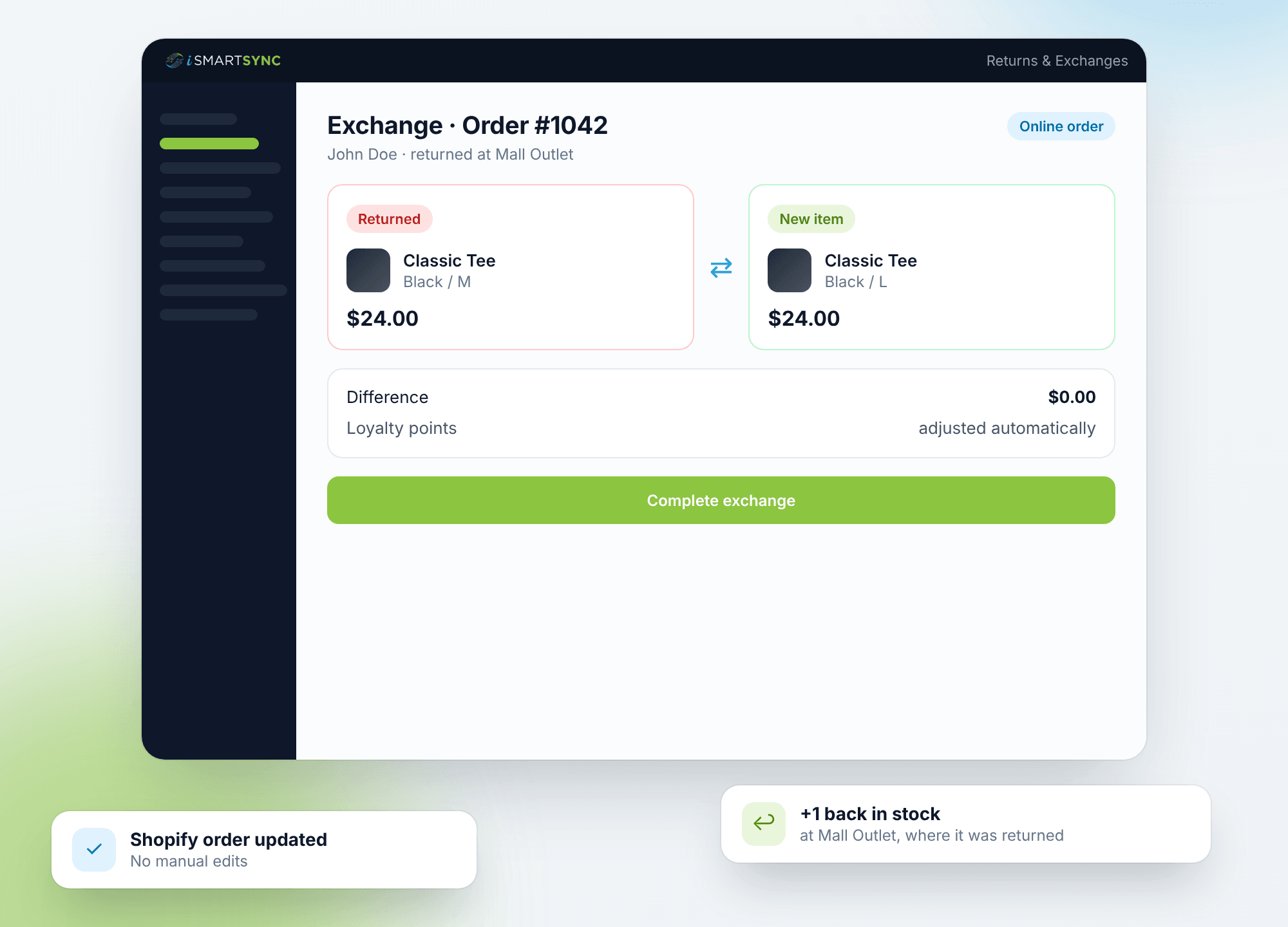
Process online orders from POS — pack, dispatch, return, or exchange items with full branch context and inventory safety.
Explore order fulfillmentMulti-branch stock control
Each branch maintains its own stock, transfers, and audit trail — mapped cleanly to Shopify locations without breaking counts.
Explore branch managementReal-time sales across counters & online
Track POS counter sales and Shopify orders together — with live stock impact and unified reporting.
Explore real-time salesReturns, exchanges & RMA logic
Handle cancellations, refusals, and returns without inventory mismatch — restock only when goods physically come back.
Explore returns & exchangesAI-powered retail analytics
AI analyzes real sales and stock movement to highlight trends, slow-moving items, and operational risks — not guesses.
Explore AI analyticsProduct, variant & barcode system
Import products from Shopify, manage variants, and generate barcodes instantly — no spreadsheets required.
Explore barcode systemAudit-ready analytics & reporting
Every sale, movement, and adjustment is traceable — know who did what, where, and when.
Explore analyticsWHY SHOPIFY BRANDS SWITCH
One system for the counter and the website.
Stop running a separate POS, a stock sheet and a courier app next to Shopify.
Features
Sales, stock, purchasing, shipping, loyalty and reports in one app.
Setup
Install, import from Shopify, add your branches and start selling.
Free trial
Try it on your own store. No card needed.
How to connect Shopify with iSmartSync POS
Authorize once. iSmartSync stays connected to Shopify across inventory, orders, and stores.
Authorize Shopify
Securely connect your Shopify store. Products, variants, customers, and orders sync automatically.
Book a demoImport locations & create branches
Fetch your Shopify locations and map them to physical branches. Each branch maintains its own stock.
See location setupImport products & prepare inventory
Bring products directly from Shopify — variants, pricing, and stock — without spreadsheets. Conflict-aware imports keep inventory clean and aligned.
See product importFAQ
Shopify Integrated POS FAQs
Answers about selling in-store with Shopify, stock sync, hardware, setup and shipping.
Still have questions? Book a demo.
Yes. iSmartSync is a complete POS screen of its own. It installs as a Shopify app, imports your products and stock from Shopify, and replaces the Shopify POS app at your counters.
Yes. iSmartSync runs in a web browser on a PC or laptop (tablets are supported too) with standard barcode scanners and thermal receipt printers, so you do not need Shopify POS hardware or Shopify Payments.
Shopify has its own POS, and many other POS systems connect to Shopify as apps from the Shopify App Store. iSmartSync is one of them: a POS built for Shopify stores with branches. It installs as a Shopify app, imports your products, prices and locations, shows Shopify orders at the counter and keeps branch stock in sync with your store.
Shopify POS is part of your Shopify plan, so it is already connected. A separate POS like iSmartSync connects as a Shopify app: start the 7-day free trial, create an app for iSmartSync in your Shopify admin, paste its Client ID and Secret into Store settings, Shopify Setup in iSmartSync, then click Connect to Shopify. Products, variants, prices and locations are imported and orders sync from then on. Step-by-step guide: ismartsync.com/install-ismartsync-on-shopify.
Shopify POS comes with every Shopify plan (plans start at $25 a month), which covers casual in-person selling. For full retail stores, Shopify sells POS Pro at $89 per location per month, billed yearly, with card readers and payment fees on top (prices from shopify.com/pos/pricing, November 2026). iSmartSync is a separate POS for Shopify stores that starts at $29 a month for the whole store, with branches added as you grow.
Not on its own. The Shopify POS app is included with paid Shopify plans, so you need a plan (from $25 a month) to use it, and POS Pro for full retail stores costs $89 per location per month, billed yearly. Card readers and payment fees are extra, and Shopify's card readers and Shopify Payments are only offered in some countries. iSmartSync does not need Shopify POS Pro or Shopify hardware, and has a 7-day free trial with no card needed.
Shopify Integrated POS
Run your branches and your Shopify store from one app
Start a 7-day free trial with no card, or book a demo and we will walk you through it on your own Shopify store.
✓ No card needed · ✓ Set up in minutes