Most retail businesses in Pakistan manage incoming stock the same way. A supplier delivers goods. Someone counts the boxes. A staff member increases the stock number manually in whatever system the business uses. A note gets made somewhere — a WhatsApp message, a notebook entry, a cell in a spreadsheet.
That process works when volume is low, when there is only one location, and when the owner is personally present for every delivery. It stops working the moment the business grows.
When a business has two or three branches, multiple suppliers, and dozens of product variants arriving every week, manual stock increases create the conditions for exactly the kind of inventory inaccuracy that causes overselling, stockouts, and audit problems.
This guide explains what a proper purchase order workflow looks like for Pakistani retailers, why it matters more as businesses scale, and how it connects to Shopify inventory management specifically.
The problem with manual stock increases
Manual stock increases are the default in Pakistani retail software. A delivery arrives. A staff member opens the system, finds the product, and types in a higher number. Stock goes up. The process is recorded nowhere except in the memory of whoever made the change.
That approach has several specific problems.
There is no record of what was ordered. If a business places an order with a supplier for fifty units and thirty arrive, the manual increase records thirty units but creates no evidence that twenty are still outstanding. That purchase stays in someone's memory or a WhatsApp thread — not in the system.
There is no record of what things cost. Manual stock increases typically record quantity but not purchase cost. That means the business cannot later answer basic questions about margins, cost of goods sold, or which supplier offered better pricing on which items.
There is no supplier accountability. If a supplier delivers the wrong variant, the wrong quantity, or damaged goods, there is no system-generated record of what was expected versus what arrived. Disputes with suppliers become word-against-word conversations with no documentation to reference.
There is no audit trail. When stock numbers are wrong — and they will eventually be wrong — a business with manual increases cannot trace back to find out when the error happened, who made it, or why. The investigation dead-ends quickly.
For a single-branch retailer doing low volume, these problems are manageable inconveniences. For a multi-branch retailer running on Shopify with significant supplier relationships and regular stock replenishment, they accumulate into operational problems that require constant manual effort to contain.
What purchase orders actually solve
A purchase order is a formal record of buying intent. It records what the business decided to buy, from which supplier, at what cost, in what quantity, and with what expected delivery date.
That single document changes the nature of the entire inbound stock process.
When a purchase order exists, receiving becomes a verification step rather than a data entry step. The question is no longer "how many arrived?" but "how many of the ordered items arrived?" Those are different questions, and the second one produces more useful information.
When received quantities are recorded against a purchase order through a Goods Receiving Note, the system can answer questions that manual increases cannot. What percentage of this order arrived? What is still outstanding? Did we receive what we expected at the cost we agreed?
When purchase orders and GRNs are linked to supplier records, the business builds a history of every transaction with every supplier. Which supplier delivers on time? Which one consistently shorts the order? Which products does each supplier provide, and at what cost?
These are not administrative details. They are the operational data that makes procurement decisions faster, smarter, and less dependent on individual memory.
How this connects to Shopify specifically
For retailers running Shopify, the inbound stock process has an additional requirement. When new stock arrives, Shopify inventory needs to update. When new products arrive for the first time, they may need to be created in Shopify.
Without a structured receiving workflow, both of these updates happen manually. Someone updates Shopify stock separately from whatever internal system the business uses. New products get created in Shopify by hand, with all the variant and SKU entry that involves.
That double entry is where errors compound. A staff member increases stock in the internal system but forgets to update Shopify. A new product gets created in Shopify with a different SKU than the internal record. Variants get entered incorrectly. Over time, the internal system and Shopify carry different numbers for the same products — and neither one is reliable.
A properly connected purchase order workflow eliminates this entirely. When goods are received and a GRN is completed, the system posts the inventory update directly to Shopify at the correct location. New products are matched by SKU — if the product exists in Shopify, stock increases against it. If it does not exist, the product and its variants are created cleanly without duplicates.
The result is a Shopify store that stays accurate through the inbound process, not just through sales and returns.
To understand how inbound stock connects to the full inventory workflow in Shopify, see Multi-Location Inventory Management and Multi-Branch Inventory and Order Management.
The GRN and why partial receiving matters
A Goods Receiving Note is the record of what actually arrived against a purchase order. It is the document that separates what was ordered from what was received.
The GRN matters most when deliveries are partial — when a supplier sends part of an order now and the balance later. This is common in Pakistani retail. Suppliers may split deliveries based on availability, transport capacity, or production batches.
Without GRN support, partial deliveries create a specific problem. If a business ordered one hundred units and fifty arrived, the options are to record all one hundred as received (wrong), record fifty and close the order (loses track of the outstanding fifty), or leave the order open and note the delivery somewhere outside the system (manual and unreliable).
A proper GRN workflow handles this cleanly. The receiving staff records exactly what arrived today — quantities, conditions, and cost per line. The system updates stock based on what was actually received. The purchase order stays open with a clear record of what has arrived and what remains outstanding. When the second delivery comes, another GRN records it against the same order.
That visibility — ordered versus received versus outstanding — is what makes procurement follow-up possible without relying on memory or external notes.
Branch-level receiving and why it matters for multi-location retail
For retailers with multiple branches, inbound stock has a location dimension that manual processes handle poorly.
When stock arrives, it arrives somewhere specific. It may arrive at a central warehouse and then be distributed to branches. It may arrive directly at a branch. It may arrive at one location when it was intended for another.
Without location-aware receiving, the system records stock increases against a general pool rather than a specific place. That total may be correct, but the branch-level picture is wrong — the same problem that affects sales-side inventory when branch-level execution is missing.
A receiving workflow with location awareness records GRNs against specific locations. Stock increases at the place where goods were received. If goods need to move to a different branch afterward, that movement is recorded as a transfer — reducing stock at the receiving location and increasing it at the destination.
That combination of location-aware receiving and branch-level transfers keeps the branch-wise inventory picture accurate throughout the entire inbound process, not just from the point of sale onward.
For a detailed look at how branch-level stock transfers work in practice, see Multi-Location and Branch Inventory Transfer.
Supplier management and why it belongs in the same system
The supplier is the starting point of every inbound stock event. Managing supplier information in the same system as purchase orders and GRNs keeps the procurement process coherent.
A supplier directory with name, code, contact details, and status means that raising a purchase order is a matter of selecting from a list rather than entering details from scratch each time. It also means the business builds a searchable history of every transaction with every supplier — what was ordered, what was received, what it cost, and when.
That history has practical value beyond record-keeping. When a retailer wants to know who supplies a specific product at the best price, the data is in the system. When a supplier dispute arises, the documentation is available. When a business is planning a restock and wants to know lead times based on past delivery patterns, that information can be extracted from transaction history rather than reconstructed from memory.
Keeping supplier management separate from purchasing — in a spreadsheet, a contacts app, or a WhatsApp list — fragments information that should live together. When the same system handles suppliers, purchase orders, and goods receiving, the relationships between those records are preserved and searchable.
Cost tracking and why it matters beyond accounting
Every purchase order line carries a cost — the unit price agreed with the supplier for each item. GRNs capture that cost at the point of receiving. That information has value beyond accounting.
Knowing the purchase cost of every received item makes it possible to calculate actual margin on every sale. Without purchase cost data, margin calculations rely on estimates or average costs that may not reflect what the business actually paid for specific batches of goods.
For fashion and apparel retailers in Pakistan who deal with seasonal pricing, fabric cost variations, and end-of-season supplier negotiations, the difference between actual purchase cost and average cost can be significant. A system that captures cost at the GRN level gives the business accurate per-batch cost data rather than a blended average.
Cost data also supports better restocking decisions. When a business can see what it paid for a product in the last three purchases, it has a reference point for evaluating new supplier quotes. That is a procurement advantage that builds over time as purchase history accumulates.
The audit trail as an operational tool
Every purchase order and every GRN creates a documented record. PO number, supplier, date, items, quantities, costs, status. GRN number, linked PO, receiving date, received quantities, received by, sync status.
That audit trail is commonly described as useful for accounting and compliance. It is also useful as a daily operational tool.
When a manager wants to know whether a specific delivery was received and at what cost, the answer is in the system. When a staff member claims that stock was received last week but the inventory number does not reflect it, the GRN record either confirms or contradicts that claim. When a supplier invoice arrives and the quantities do not match what the business received, the GRN is the reference document for the dispute.
For multi-branch retailers where the owner or manager is not physically present for every delivery, the audit trail provides visibility that would otherwise require either trust or constant follow-up calls.
What a clean purchasing workflow looks like in practice
A well-structured purchase order workflow for a Pakistani retailer on Shopify should work something like this.
The business maintains a supplier directory in the same system as purchasing. Each supplier has a profile with contact details and transaction history.
When a restock is needed, a purchase order is raised against the relevant supplier. Items are selected from the product catalog, quantities and unit costs are entered, expected delivery date is set, and the PO is issued. A printed or digital copy goes to the supplier.
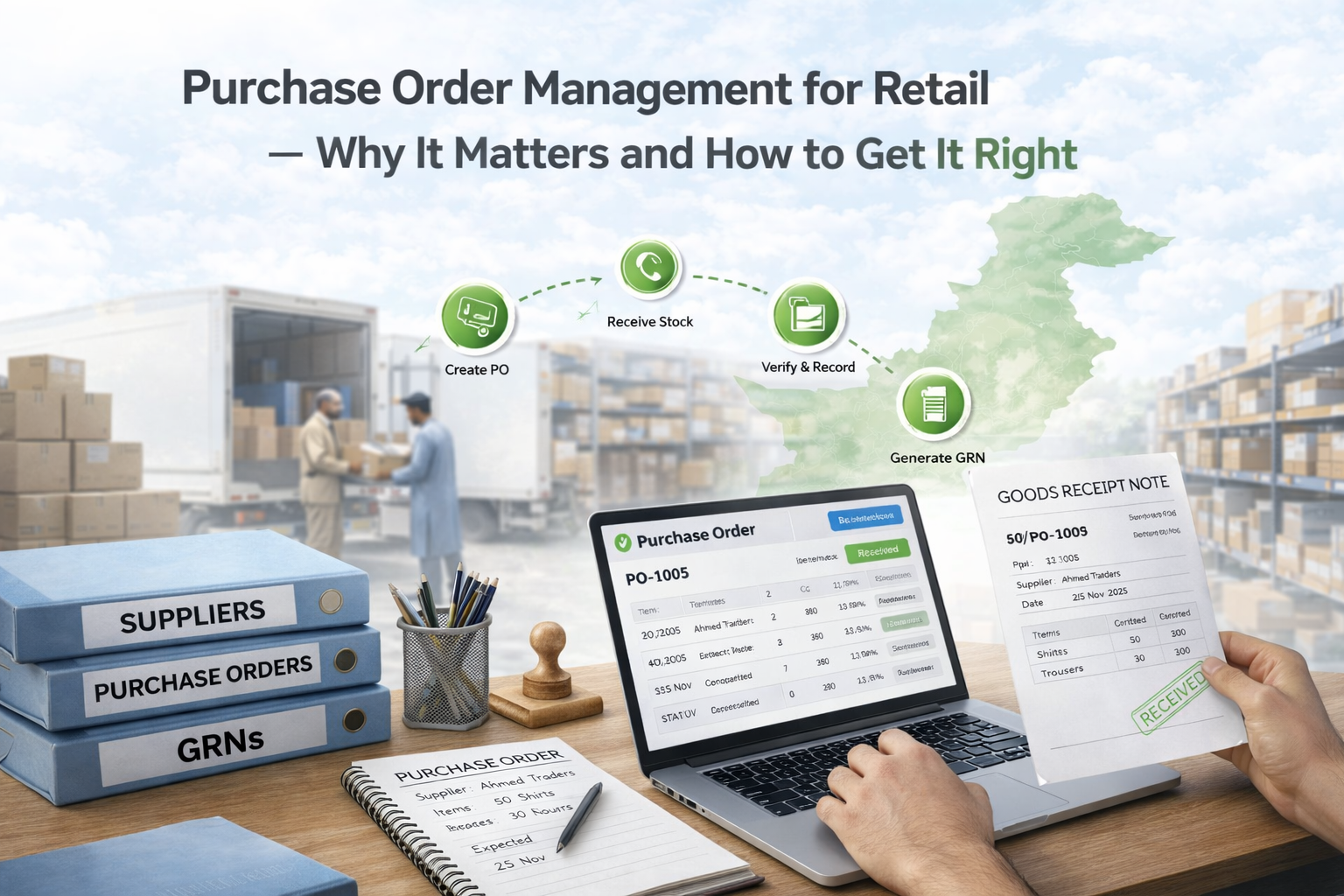
When goods arrive, a Goods Receiving Note is created against the relevant PO. Staff record what actually arrived — line by line, with quantities and any cost adjustments. If only part of the order arrived, the GRN records the partial receipt and the PO stays open for the balance.
When the GRN is confirmed, inventory updates at the receiving location. For products that already exist in Shopify, stock increases against the matching SKU at the correct Shopify location. For new products, the system creates them in Shopify with the correct variants without duplicating existing records.
If the received goods need to move to a different branch, a stock transfer is initiated. The sending location records the outgoing movement. The receiving branch confirms receipt. Stock moves cleanly between locations with a traceable record.
At any point, the business can see the status of every purchase order — issued, partially received, fully received, or cancelled. It can see which suppliers have outstanding deliveries, which products are expected to arrive, and what the total committed purchasing value is.
That is the operational clarity that a proper purchasing workflow produces — and that manual stock increases cannot.
For a full overview of how purchasing connects to the rest of the inventory workflow in iSmartSync, see Purchase Order and Inventory Management Software.
How iSmartSync handles purchasing for Shopify retailers
iSmartSync includes a complete purchasing workflow built specifically for Shopify retailers managing physical stock across one or more locations.
The workflow follows a straight line — Local Catalog, Purchase Order, Goods Receiving Note, Post to Shopify — with each step connected to the next and no external tools or manual workarounds required.
Suppliers are managed in a central directory. Purchase orders are raised against supplier records with auto-assigned PO numbers, line-level quantities and costs, tax and discount handling, and a printable layout the supplier can follow. GRNs are created against open purchase orders and support partial receiving so that split deliveries are handled accurately without closing orders prematurely.
When a GRN is confirmed, stock posts to Shopify using SKU matching. If the product exists in Shopify, stock increases at the correct location. If the product does not exist, it is created — along with the required variants — without creating duplicates. The sync status is visible on the GRN so staff can confirm whether the Shopify update succeeded.
Products are managed in a local catalog that supports variant auto-generation. Entering size and colour options produces all combinations automatically, with SKU and cost fields ready for purchase order entry. CSV import is available for larger catalogs.
The purchasing workflow connects directly to branch-level inventory — stock received at a location is available at that location for sales, fulfillment, and transfer. The full audit trail of every PO and GRN is preserved in the system.
Pricing for iSmartSync starts at $29 per month with add-ons available as the business scales.
To explore how the purchasing workflow connects to the rest of retail operations, see Shopify Integrated POS Point of Sale and Multi-Branch Inventory and Order Management.
Final thoughts
Purchase order management is where inventory accuracy begins. For Pakistani retailers managing inbound stock manually, the problems that show up later — wrong Shopify counts, supplier disputes, unexplained stock discrepancies — often trace back to the inbound process rather than to sales or returns.
A proper purchasing workflow — supplier records, structured purchase orders, goods receiving notes, and location-aware Shopify sync — eliminates the manual steps that create these problems. It also builds the operational data that makes procurement smarter over time: supplier history, cost records, partial delivery tracking, and a full audit trail of every inbound stock event.
For retailers growing beyond a single location or a single supplier, moving from manual stock increases to a structured purchasing workflow is one of the most valuable operational changes available. It is also the change that makes every downstream inventory process — sales, fulfillment, transfers, returns — more reliable from the start.
Explore how iSmartSync handles purchase orders, GRNs, and Shopify inventory sync at ismartsync.com.