In many shops, everyone logs in with the same account. It is quick on day one and a problem on day ninety, when a price was changed, a refund was given, or a report was exported, and nobody knows who did it.
Roles fix that. Each person gets their own login, and each role can only do what that job needs. This guide shows a simple setup that works for a single shop and scales to many branches.
Why roles matter
- Fewer mistakes. A cashier who can't edit prices can't change one by accident.
- Less temptation. Refunds and large discounts need a second person.
- Clear accountability. Every action is linked to a person, not a shared login.
- A cleaner screen. Staff see only the pages they use, so training is faster.
Four roles most shops need
Cashier
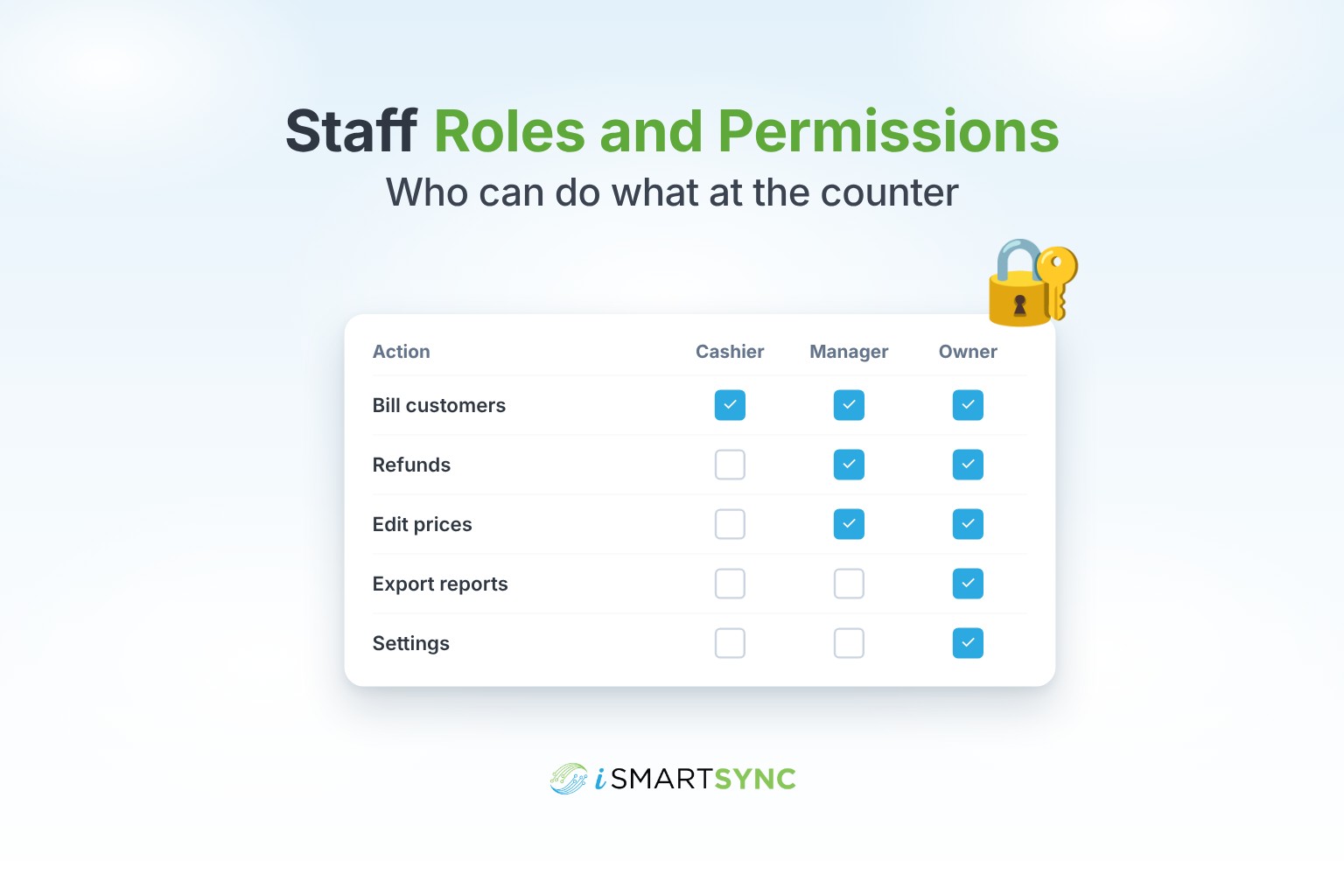
Bills customers, takes payment, prints receipts, opens and closes their own shift. Should not: edit prices or products, give large discounts or refunds alone, see other branches, or export reports.
Supervisor
Everything a cashier does, plus approving refunds, exchanges and bigger discounts at the counter. Should not: change settings or staff accounts.
Branch manager
Runs one branch: reports for that branch, stock transfers, receiving stock, managing shifts and cash logs. Should not: see or change other branches, unless they manage more than one.
Owner or admin
Everything, across all branches: settings, staff, plans, all reports and exports.
Many shops also add an Inventory role for the person who receives stock, counts it and handles transfers, without access to the till.
Actions worth protecting
These are the actions where a wrong click costs money. Give them only to the roles that need them, or require a supervisor approval:
- Refunds and exchanges
- Discounts above a set amount
- Price overrides at the counter
- Stock adjustments
- Report exports, since they contain your sales and customer data
- Deleting or cancelling orders
- Changing staff accounts and settings
Supervisor approval at the counter
Blocking an action completely can slow the queue. A better pattern is approval: the cashier starts the refund, a supervisor enters their PIN, and the action goes through and is logged with both names. Checkout keeps moving and you keep control.
Keep an access log
An access log records who did what and when: logins, refunds, price changes, exports. You won't read it every day. It is there for the day you need it.
Set up roles in five steps
- List the jobs in your shop, not the people.
- Create one role per job, starting from presets like Owner, Manager, Cashier and Inventory.
- Tick the pages and actions each role can use.
- Give every staff member their own login and assign their role and branch.
- Turn on supervisor approval for refunds and big discounts.
Review the roles every few months, and remove logins the same day someone leaves.
How iSmartSync does it
iSmartSync lets you create roles from presets or from scratch, control page access and actions such as refunds, price overrides, exports and stock edits, and ask for a supervisor PIN on sensitive actions. Key actions are logged and two-factor sign-in adds another layer of protection. Roles work the same across every branch.
See user roles and permissions, or start your 7-day free trial. No card needed.
Common questions
Should every cashier have their own login? Yes. Shared logins make it impossible to know who did what.
Can I let a manager see reports but not export them? Yes. Report access and export permission can be set separately.
Do approvals slow down checkout? Not much. A supervisor PIN takes a few seconds, and it only applies to the actions you choose.